Acronis True Image คืออะไร
Acronis True Image เป็นโปรแกรมที่ใช้สำหรับแบ็คอัพข้อมูลไม่ว่าจะเป็นข้อมูลที่เป็นโฟลเดอร์หรือข้อมูลทางไดร์ฟซึ่งผลิตโดย Acronis Inc. ซึ่งจะคล้ายกับโปรแกรมแบ็คอัพข้อมูลที่ชื่อว่า Norton Ghost จาก Symantec แต่ด้วย Interface ที่ใช้ง่านกว่าและรองรับการทำงานที่ยืดหยุ่นกว่าทําให้โปรแกรม Acronis True Image เป็นที่รูจักกันอย่างแพร่หลายในวงการผู้ใช้งานและดูแลระบบคอมพิวเตอร์ โดยมีจุดเด่นที่สามารถสร้าง Image และนำไปใช้กับฮาร์ดแวร์หรือเมนบอร์ดที่ต่างกันได้โดยใช้ฟังค์ชั่น Acronis Universa Restore อีกทั้งสามารถแบ็คอัพข้อมูลลงในสื่อบันทึกข้อมูลได้หลายหลากประเภท สำหรับการใช้งานให้เลือกหลายรูปแบบ เช่น การแบ็คอัพแบบ Full, Incremental และ Differential และเราสามารถกำหนดการแบ็คอัพได้ทั้งแบบไฟล์หรือว่าโฟลเดอร์ลงเป็นไฟล์อิมเมจได้ ซึ่งอิมเมจไฟล์นี้เราสามารถแก้ไข หรือเปลี่ยนแปลงได้ตามต้องการ
คุณสมบัติของ Acronis True Image
- การสำรองข้อมูล: สามารถสำรองข้อมูลทั้งระบบปฏิบัติการ (OS) และข้อมูลที่เก็บไว้ในฮาร์ดไดรฟ์ได้อย่างเต็มรูปแบบ
- สร้างภาพของระบบปฏิบัติการ: สามารถสร้างภาพของระบบปฏิบัติการที่ทำงานอยู่เพื่อเป็นการสำรองที่สมบูรณ์
- การกู้คืนข้อมูล: มีความสามารถในการกู้คืนข้อมูลที่สำรองไว้ในกรณีที่เกิดเหตุการณ์เสียหายหรือความล้มเหลวของระบบ
- ความปลอดภัยของข้อมูล: มีเครื่องมือในการเข้ารหัสข้อมูลที่สำรองไว้เพื่อความปลอดภัยสูงสุด
- การทำงานแบบเรียลไทม์: มีความสามารถในการสำรองข้อมูลและกู้คืนข้อมูลได้อย่างต่อเนื่องและเรียลไทม์
Features
- 2TB+ drives Protect over 2 terrabytes of files, programs, and other content
- Network backup Your NAS device is detected automatically, so you can backup multiple network PCs to a secure storage site
- View before restore Get a clear preview of what your system looked like during each backup and choose what to restore
- Media versatility Use any storage devices -DVDs, USB keys, external hard drives, GPT drives, and even cloud storage
- Privacy True Image is armed with robust government-grade AES-256 encryption to keep your data secure
- Mobile apps. Your files are available from all your favorite devices, from smartphones to tablets and PCs
- Disk Imaging. Restore – not just the files, but the exact configuration of your computer including your operating system, settings, and applications
- Nonstop backup. Ongoing changes are recorded as you work, so you can revisit any file, folder or your entire system as it was at any point in time
- Incremental backups Changes are captured since the last backup. That saves time and disk space
- Try&Decide You decide if you want to keep the changes made to your system by potentially dangerous software or websites
- Secure Zone Store a disk backup on your system drive. Recover wherever you are, even if your operating system has failed
- Set and Forget You choose when and how frequently True Image does backups – even when you aren’t using your computer
- Background operation True Image works in the background and doesn’t affect the running processes
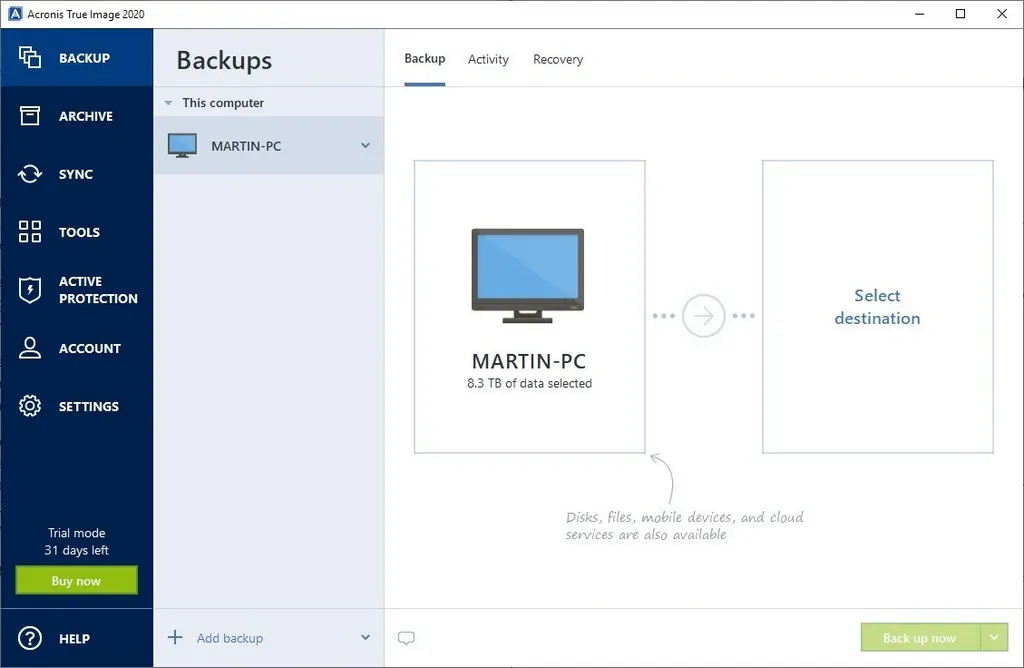
ภาพตัวอย่าง (Screenshot)

ความต้องการของระบบ
- ระบบปฏิบัติการ: Windows 11 / 10 / 8.1 / 7 (32-bit และ 64-bit)
- หน่วยความจำ (RAM): 2 GB (4 GB แนะนำ)
- พื้นที่ว่างในฮาร์ดดิสก์: 1 GB ขึ้นไป
ข้อมูลไฟล์
- ผู้พัฒนา: Acronis
- ประเภทใบอนุญาต: Shareware
- ภาษา: รองรับหลายภาษา
- รูปแบบไฟล์: .rar
- ขนาดไฟล์: 1.12 GB
- เวอร์ชัน: Build 42072
- วันที่อัปเดตล่าสุด: 29/1/2022
- เซิร์ฟเวอร์ดาวน์โหลด: Pixeldrain
Disclaimer
เว็บไซต์นี้ไม่ได้เป็นเจ้าของลิขสิทธิ์ของซอฟต์แวร์ ลิงก์ทั้งหมดเป็นแหล่งภายนอก เนื้อหานี้จัดทำขึ้นเพื่อการแนะนำซอฟต์แวร์เท่านั้น ผู้ใช้ควรตรวจสอบเงื่อนไขจากผู้พัฒนาโดยตรง
โปรดระมัดระวังโฆษณาที่อาจเด้งไปยังหน้าอื่น และตรวจสอบชื่อไฟล์รวมถึงขนาดไฟล์ก่อนดาวน์โหลดทุกครั้ง