


ดาวน์โหลดโปรแกรม Core Temp เป็นเครื่องมือที่ใช้ดูอุณหภูมิความร้อนของ CPU และแสดงค่า CPU Boot Clock ทุก Core จำเป็นต้องมีติดไว้เพื่อดูความร้อน
Core Temp คืออะไร
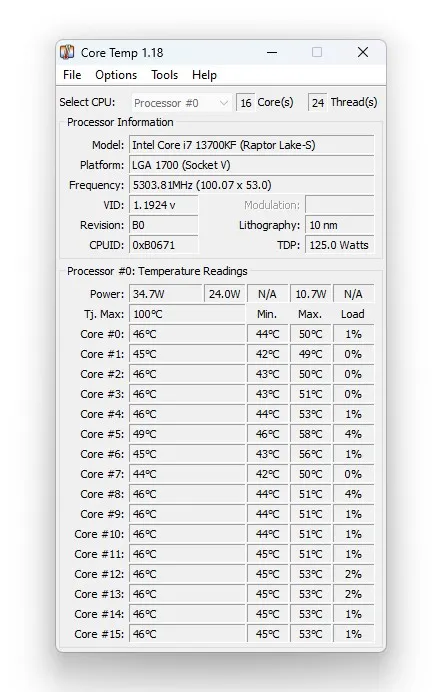
Core Temp เป็นโปรแกรมขนาดเล็กกะทัดรัด ใช้งานง่ายไม่ยุ่งยากและใช้พื้นที่น้อย ไว้ตรวจสอบอุณหภูมิโปรเซสเซอร์และข้อมูลสำคัญอื่นๆของ CPU มันสามารถแสดงอุณหภูมิของแต่ละคอร์ของโปรเซสเซอร์ทุกตัวในระบบของคุณ และยังสามารถดูความผันผวนของอุณหภูมิได้แบบเรียลไทม์ด้วยปริมาณงานที่แตกต่างกัน สรุปมันเป็นซอฟต์แวร์ฟรีที่ให้ข้อมูลเกี่ยวกับอุณหภูมิของหน่วยประมวลผล (CPU) ในคอมพิวเตอร์ โปรแกรมนี้ถูกออกแบบมาเพื่อรวบรวมข้อมูลอุณหภูมิจากแต่ละคอร์ของ CPU และแสดงผลให้ผู้ใช้ดูได้ง่าย
คุณสมบัติของ Core Temp
- อุณหภูมิ CPU: แสดงอุณหภูมิปัจจุบันของแต่ละคอร์ของ CPU
- ข้อมูลเกี่ยวกับ CPU: แสดงข้อมูลเกี่ยวกับโมเดล, ยี่ห้อ, และคุณสมบัติอื่น ๆ ของ CPU
- รายงานความร้อนมาก: แสดงการเตือนเมื่ออุณหภูมิของ CPU สูงเกินไป
- การทำงานกับหลายรูปแบบ CPU: รองรับหลายรูปแบบ CPU ที่ใช้กันทั่วไป
- การตรวจจับอุณหภูมิ GPU: สามารถตรวจจับและแสดงอุณหภูมิของกราฟิกการ์ด (GPU) ได้
Features
- Easy to use
- Show results for users to view easily
- Show temperature in Fahrenheit self-explanatory
- Shows information about the CPU model, brand, and other features
- Shows a warning when the CPU temperature is too high
- Detect and display graphics card (GPU) temperature
- Supports many commonly used CPU formats
- Show Delta to Tj.Max
- It will automatically launch a G15 applet and display the temperature on the G15 display
- See temperature fluctuations in real time with varying workloads
มีอะไรใหม่ v1.19.5
- New: Support for Zen 4 AMD processors including ThreadRipper 7000 series, Raphael, Dragon Ridge, Genoa ES, Hawk Point, Phoenix
- New: Support for Zen 5 AMD processors including ThreadRipper 9000 series, Granite Ridge, Fire Range, Strix Halo, Strix Point, Krackan Point, Turin
- New: Per-CCD and per-core temperature readings for all generations of Zen based processors, most models supported
- New: TDP and TjMax detection on most Zen based processors
- New: Support for Intel processors including Sapphire Rapids, Emerald Rapids, Granite Rapids, Lunar Lake M, and preliminary Panther Lake
- New: Dark Mode (requires Windows 10 or newer OS)
- New: Effective core frequency readings + system tray icon
- New: Core select menu for frequency (right click the frequency fields)
- New: P-Core/E-Core tooltip indicators
- New: Folder selection for log file path
- New: Windows Event Log reporting for Overheat Protection events
- New: System Information dialog upgraded
- New: Average measurement field for temperatures
- Fix: BSOD on some newer AMD machines
- Fix: Vulnerabilities in driver and better restrict driver access
- Fix: Improve frequency detection accuracy on AMD processors by using a new algorithm
- Fix: Frequency detection on newer Intel processors
- Fix: Many other fixes for older AMD and Intel processors
- Fix: Window size on DPI, resolution and display changes
- Fix: Button sizes in the settings dialog in some languages
- Fix: UI glitches on older OSes
- Change: Make the look and feel of the UI on AMD processors to be the same as Intel
- Change: Both Tdie and Tctl readings are displayed on Zen 1 processors when applicable
- Change: Mini-Mode and TjMax adjust options removed
- Change: Modulation field replaced with Effective frequency
ความต้องการของระบบ
- ระบบปฏิบัติการ: Windows 11 / 10 / 8.1 / 7 (32-bit และ 64-bit)
- หน่วยความจำ (RAM): 2 GB (4 GB แนะนำ)
- พื้นที่ว่างในฮาร์ดดิสก์: 100 MB ขึ้นไป
ข้อมูลไฟล์
- ผู้พัฒนา: Arthur Liberman
- ประเภทใบอนุญาต: Freeware
- ภาษา: รองรับหลายภาษา
- รูปแบบไฟล์: .rar
- ขนาดไฟล์: 1 MB
- เวอร์ชัน: 1.19.5.69
- วันที่อัปเดตล่าสุด: 19/10/2025
- เซิร์ฟเวอร์ดาวน์โหลด: Official
ข้อมูลสำคัญก่อนดาวน์โหลด
วิธีดาวน์โหลด: ดูขั้นตอนการดาวน์โหลด