
ดาวน์โหลดโปรแกรม KMS 2038 Digital Online Activation Suite โปรแกรมแอคติเวท เปิดใช้งาน Microsoft Windows และ Microsoft Office ทุกเวอร์ชั่นให้เป็นของแท้
KMS 2038 Digital Online Activation Suite คืออะไร
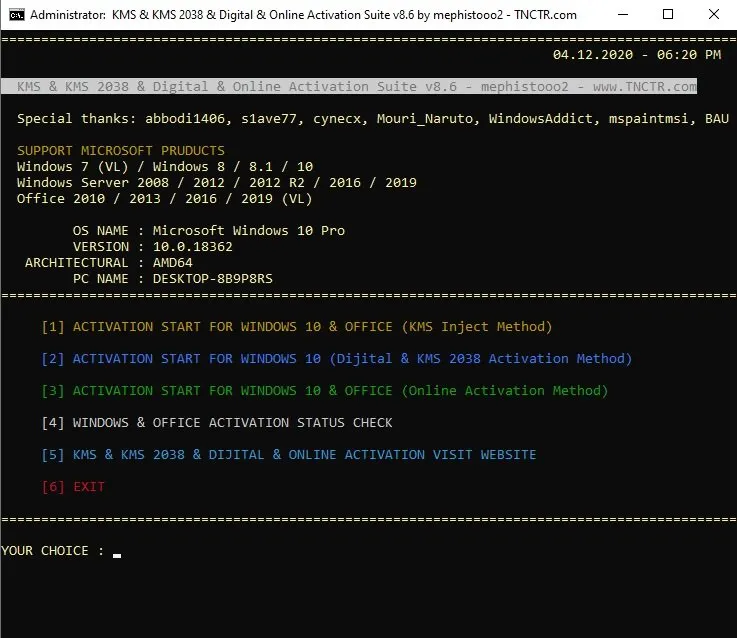
KMS 2038 Digital Online Activation Suite เป็นตัว Activation เปิดใช้งาน Windows และ MS Office เป็นของแท้ สามารถเปิดใช้งาน Windows OS หรือ MS Office ทุกเวอร์ชั่น ง่ายๆ เป็นเครื่องมือที่ไม่มีไวรัส สามารถวางใจในเครื่องมือนี้ได้เลย ตัวนี้สามารถทำการ Activate ได้ถึง 4 รูปแบบ คือ KMS Inject, Digital, KMS 2038 และ Online activations
- เปิดใช้งาน Windows: ใช้สำหรับการเปิดใช้งานเวอร์ชันต่าง ๆ ของ Windows เช่น Windows 10, Windows Server เป็นต้น
- เปิดใช้งาน Office: ใช้สำหรับการเปิดใช้งาน Microsoft Office เวอร์ชันต่าง ๆ เช่น Office 2016, Office 2019, และ Office 2021
- เปิดใช้งานแบบอัตโนมัติ: ช่วยให้การเปิดใช้งานทำได้อย่างง่ายดายและรวดเร็ว โดยไม่ต้องใช้คีย์ผลิตภัณฑ์ที่ซื้อจาก Microsoft
- ปรับปรุงออนไลน์: บางครั้งสามารถอัปเดตตัวเองเพื่อรองรับการเปิดใช้งานซอฟต์แวร์เวอร์ชันใหม่ ๆ
คุณสมบัติของ KMS 2038 Digital Online Activation Suite
- KMS 2038 Digital Online Activation 3 methods are also $OEM$ activation support
- To reactivate the system during installation, copy the $OEM$ folder to the “sources” folder in the installation media (iso/usb)
- $OEM$ activation method also enables the KMS task scheduling system during installation (digital and KMS2038 activation method except)
- With this method, the connection to the virtualized KMS server is provided to the SppExtComObj.exe file in the \ Windows \ system32 \ directory, which enables the activation process to be performed, thus assuming that the operating system is connected to a real license server
- Antivirus applications may show activation files as malicious
- The Inject method is 100% clean (at least for now)
- Digital activation for Windows 10 is a method that Microsoft has developed exclusively for Windows 10 to enable easy re-activation of hardware on PCs after reboot
- In the KMS method, if the license server is being virtualized, this method also enables digital activation on your PC as if a hardware change has occurred
- This method requires an internet connection and provides a permanent activation
- Only works for Windows 10, works on all versions
- Up to now known antivirus applications have not seen files of this method as harmful
- Windows 10 KMS 2038 activation method belongs to s1ave77 user MDL (thanks to him)
- With this method, you can use your Windows 10 product licensed by 2038
- Up to now known antivirus applications have not seen files of this method as harmful
- Internet connection is not required for this method
- Some charitable users (mostly Chinese) on the Internet, publicly publish their own KMS servers, so you can use Windows and Office products licensed for 180 days
Supported
- Windows 7/8/8.1/10/11 (All versions)
- Windows Server 2008/R2/2012/2012 R2/2016/2019 (All versions)
- Office 2010/2013/2016/2019 (VL)
ความต้องการของระบบ
- ระบบปฏิบัติการ: Windows 11 / 10 / 8.1 / 7 (32-bit และ 64-bit)
- หน่วยความจำ (RAM): 2 GB (4 GB แนะนำ)
- พื้นที่ว่างในฮาร์ดดิสก์: 100 MB ขึ้นไป
ข้อมูลไฟล์
- ผู้พัฒนา: tnctr
- ประเภทใบอนุญาต: Freeware
- ภาษา: รองรับหลายภาษา
- รูปแบบไฟล์: .rar
- ขนาดไฟล์: 1 MB
- เวอร์ชัน: 9.9
- วันที่อัปเดตล่าสุด: 10/10/2024
- เซิร์ฟเวอร์ดาวน์โหลด: Pixeldrain
ข้อมูลสำคัญก่อนดาวน์โหลด
- วิธีดาวน์โหลด: ดูขั้นตอนการดาวน์โหลด
- รหัสแตกไฟล์: ไม่มี