Adobe InCopy 2021 v16.4.0.55 | ถาวร พิสูจน์อักษร ตรวจคำผิด

ดาวน์โหลดโปรแกรม Adobe InCopy 2021 ตัวเต็มถาวร โปรแกรมประมวลผลคำ พิสูจน์ตัวอักษร ตรวจสอบคำผิด ใช้สำหรับเขียน แก้ไข ข้อความสำหรับสิ่งพิมพ์
Adobe InCopy 2021 คืออะไร
Adobe InCopy 2021 เป็นโปรแกรมประมวลผลคำใช้สำหรับเขียน แก้ไข ออกแบบข้อความสำหรับสิ่งพิมพ์ สามารถพิสูจน์ตัวอักษร ตรวจสอบคำผิด นับคำทั้งหมด ตรวจสอบไวยากรณ์ที่อยู่ในไฟล์สิ่งพิมพ์ทั้งหมดก่อนเริ่มพิมพ์ InCopy CC ช่วยให้คุณสามารถเขียน แก้ไข และออกแบบ เอกสารต่างๆ ได้หลากหลายรูปแบบไม่ว่าจะเป็น นิตยสาร วารสาร ได้อย่างมืออาชีพ
คุณสมบัติของ Adobe InCopy 2021
- การเขียนและการแก้ไขข้อความ: รองรับการเขียนและแก้ไขข้อความอย่างมืออาชีพ พร้อมเครื่องมือสำหรับการจัดรูปแบบตัวอักษร, การตรวจสอบการสะกด, และการนับคำ
- การทำงานร่วมกับ Adobe InDesign: ช่วยให้นักเขียนและนักออกแบบสามารถทำงานในเอกสารเดียวกันได้พร้อมกัน โดยไม่ทำให้เกิดปัญหาการแก้ไขซ้ำซ้อน (conflict)
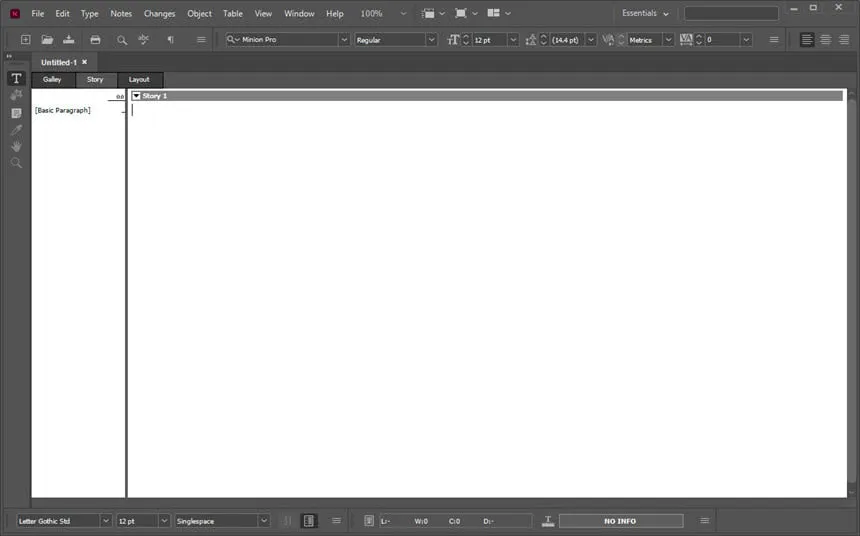
- โหมดการดูหลายแบบ: มีโหมดการดูหลายแบบ เช่น Story View, Galley View, และ Layout View เพื่อให้ผู้ใช้สามารถดูและแก้ไขข้อความในรูปแบบที่ต้องการได้
- การติดตามการเปลี่ยนแปลง: รองรับการติดตามการเปลี่ยนแปลง (Track Changes) ทำให้ผู้ใช้สามารถดูและยอมรับหรือปฏิเสธการแก้ไขที่เกิดขึ้นได้
- การจัดการการทำงานร่วมกัน (Collaboration): ช่วยให้ทีมงานสามารถทำงานร่วมกันในโครงการเดียวกันได้ โดยการล็อกและปลดล็อกคอนเทนต์ที่กำลังถูกแก้ไข
- การรวมกับระบบการจัดการเนื้อหา (CMS): รองรับการรวมกับระบบการจัดการเนื้อหาต่าง ๆ ทำให้การนำเข้าข้อมูลและการจัดการคอนเทนต์เป็นไปอย่างราบรื่น
- การสร้างและการจัดการสไตล์: สามารถสร้างและจัดการสไตล์การจัดรูปแบบตัวอักษรและย่อหน้าได้ เพื่อให้การจัดรูปแบบเป็นไปอย่างรวดเร็วและสอดคล้องกัน
- การสนับสนุนหลายภาษา: รองรับการใช้งานหลายภาษาและการตั้งค่าภาษาเฉพาะในแต่ละเอกสาร
- การพิมพ์และการส่งออก: สามารถพิมพ์เอกสารหรือส่งออกเป็นไฟล์ PDF และรูปแบบอื่น ๆ ตามความต้องการ
Features
- Footnotes that include columns
- Improvements to OpenType fonts
- Modernized user interface
- More comfortable work with glyphs
- Placing images in tables
- Easy use of shadows for text, including shifting control
- Gun for placing borders around tables
- New Find previous command
- Memory of shortcuts and preferences when upgrading to the latest version
- Improved text wrapping in footers
- Folders of color samples to facilitate sample management
- Editing tables by dragging and dropping
- Support for high resolution displays and Retina
- Integration with the Adobe Typekit library
- Synchronization of Typekit fonts
- Faster font search
- Simplified hyperlink creation
- Different page views when editing
- Improved text matching while working
- A Cloud Save command that provides access to files on any device
- Recently used fonts
- Middle Eastern language support
- Endnote support
- Add paragraph borders
- Find similar fonts
- Advanced font filtering
- Footnotes that span columns
- Open Type enhancements
- Modern user interface
- Work with glyphs easily
- Place images into tables
- Simple application of shading to text; includes controls for offsets and more
- Place Gun for adding borders to tables
- New Find Previous command
- Shortcuts and preferences memory
- Footnote enhancements that respect text wrap
- Color swatch folders for swatch management
- Drag-and-drop table editing
- HiDPI and Retina display support in Windows
- Adobe Typekit integration
- Typekit font syncing
- Quick font searching
- Convenient hyperlink creation
- Different page views when editing
- Enhanced copyfitting
- Save to Cloud command lets you access files on any device
- View recently used fonts
- Middle Eastern language support
ความต้องการของระบบ (System Requirements)
- ระบบปฏิบัติการ: Windows 11 / 10 / 8.1 / 7 (64-bit)
- หน่วยความจำ (RAM): 4 GB (8 GB แนะนำ)
- พื้นที่ว่างในฮาร์ดดิสก์: 3 GB ขึ้นไป
ข้อมูลไฟล์ (File Info)
- ผู้พัฒนา: Adobe Inc
- ใบอนุญาต: Shareware
- ภาษา: รองรับหลายภาษา
- ขนาดไฟล์: 889 MB
- เวอร์ชัน: 16.4.0.55
- ประเภทไฟล์: *.zip
- อัปเดตเมื่อ: 20/8/2021