
ดาวน์โหลด SQL Backup Master ฟรี ตัวเต็มถาวร โปรแกรมสำรองฐานข้อมูล SQL Server อัตโนมัติขึ้นคลาวด์ได้หลายเจ้า ใช้งานง่าย เหมาะกับ DBA และองค์กร
รายละเอียดเกี่ยวกับ SQL Backup Master
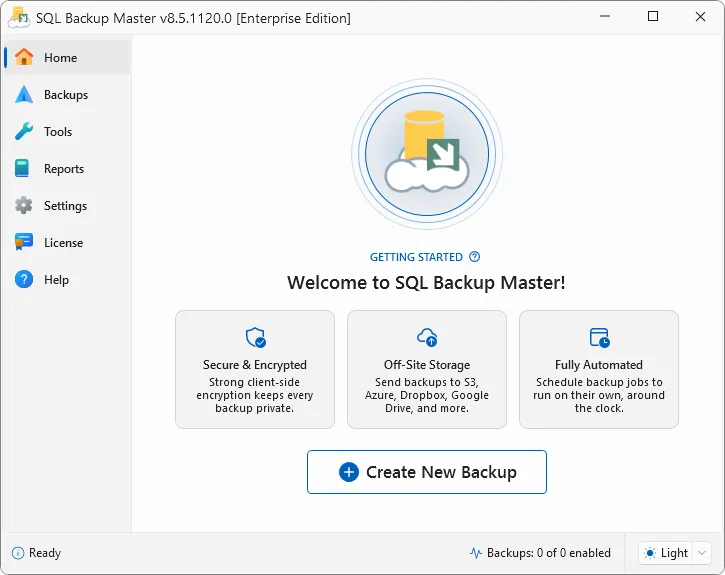
SQL Backup Master คือโปรแกรมสำรองฐานข้อมูล SQL Server แบบอัตโนมัติ พร้อมส่งไฟล์แบ็กอัปไปเก็บไว้ในที่ปลอดภัย ไม่ว่าจะเป็นโฟลเดอร์ภายในเครื่อง เครือข่ายภายในองค์กร เซิร์ฟเวอร์ FTP หรือบริการคลาวด์สตอเรจยอดนิยมอย่าง Dropbox, Google Drive, OneDrive และ Amazon S3 คนที่ดูแลระบบฐานข้อมูลองค์กรน่าจะเข้าใจดีว่าการสำรองข้อมูล SQL Server ด้วยมือทุกวันเป็นเรื่องที่เสี่ยงต่อความผิดพลาดมาก แค่ลืมทำสักครั้งเดียวอาจหมายถึงข้อมูลลูกค้าทั้งหมดหายไปในพริบตาถ้าเซิร์ฟเวอร์มีปัญหา
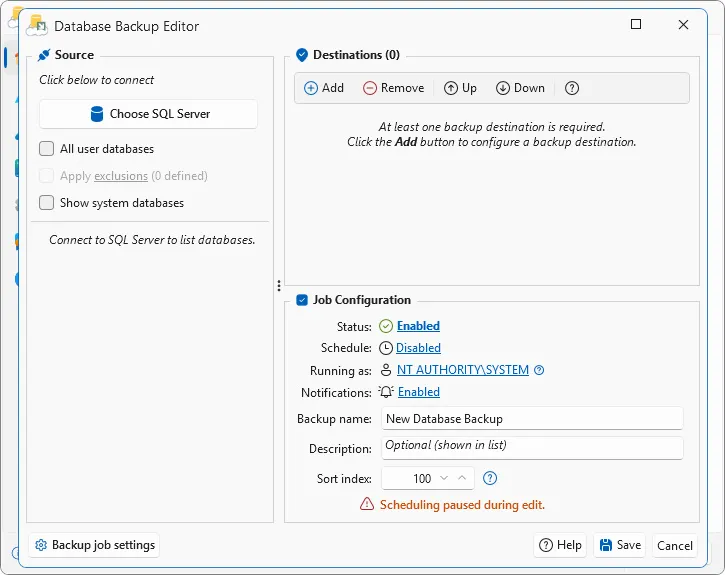
จุดเด่นที่ทำให้ SQL Backup Master ได้รับความไว้วางใจจากผู้ดูแลระบบทั่วโลกคือความง่ายในการตั้งค่า ผู้ใช้ไม่จำเป็นต้องเขียนสคริปต์ซับซ้อนเหมือนการตั้งค่าผ่าน SQL Server Management Studio เอง เพียงเลือกฐานข้อมูลที่ต้องการสำรอง กำหนดตารางเวลา เลือกปลายทางจัดเก็บ แล้วเปิดใช้งานการเข้ารหัสหรือบีบอัดไฟล์ตามต้องการก็เสร็จเรียบร้อย ตัวโปรแกรมยังทำงานเป็น Windows Service อยู่เบื้องหลัง ทำให้ไม่ต้องล็อกอินเข้าเครื่องตลอดเวลาก็ยังสำรองข้อมูลได้ตามตารางที่ตั้งไว้ ด้วยความสามารถที่ครบเครื่องและใช้งานง่ายระดับนี้ SQL Backup Master จึงเป็นหนึ่งในเครื่องมือที่ธุรกิจขนาดเล็กไปจนถึงองค์กรขนาดใหญ่เลือกใช้เพื่อป้องกันข้อมูลสูญหาย
ฟีเจอร์เด่นของ SQL Backup Master
- สำรองฐานข้อมูล SQL Server ได้ทุกเวอร์ชัน ตั้งแต่ 2005 จนถึงเวอร์ชันล่าสุด รวมถึง Azure SQL และ Amazon RDS SQL
- ส่งไฟล์แบ็กอัปขึ้นคลาวด์สตอเรจได้หลายเจ้า ทั้ง Dropbox, Google Drive, OneDrive, Box และ Amazon S3
- รองรับบริการจัดเก็บแบบ S3-compatible เพิ่มเติม เช่น Cloudflare R2, Backblaze B2 และ Wasabi
- บีบอัดและเข้ารหัสไฟล์แบ็กอัปด้วยมาตรฐาน AES เพื่อความปลอดภัยของข้อมูล
- ตั้งตารางเวลาสำรองข้อมูลอัตโนมัติ พร้อมทำงานเป็น Windows Service อยู่เบื้องหลังตลอดเวลา
- รันสคริปต์ SQL และแบตช์สคริปต์ก่อนหรือหลังกระบวนการสำรองข้อมูลได้ตามต้องการ
- กู้คืนข้อมูลแบบ Batch Restore เลือกเปลี่ยนชื่อฐานข้อมูลและกำหนดโฟลเดอร์เก็บไฟล์ข้อมูลแยกจากไฟล์ล็อกได้
- แจ้งเตือนผลการสำรองข้อมูลผ่านอีเมลและรองรับคำสั่งผ่าน PowerShell Cmdlet สำหรับงานระดับสูง
SQL Backup Master เหมาะกับผู้ดูแลระบบและองค์กรที่ต้องการความมั่นใจว่าข้อมูลในฐานข้อมูล SQL Server จะปลอดภัยอยู่เสมอ โดยไม่ต้องเสียเวลาสำรองข้อมูลด้วยมือหรือเขียนสคริปต์ซับซ้อน จุดแข็งของโปรแกรมนี้อยู่ที่การรองรับปลายทางจัดเก็บข้อมูลที่หลากหลาย ทั้งคลาวด์และภายในองค์กรเอง บวกกับระบบเข้ารหัสและบีบอัดที่ช่วยประหยัดพื้นที่จัดเก็บและเพิ่มความปลอดภัยไปพร้อมกัน ถ้าใครกำลังมองหาโปรแกรมสำรองฐานข้อมูล SQL Server ที่ใช้งานง่ายแต่ยังคงความสามารถระดับมืออาชีพ SQL Backup Master ถือเป็นตัวเลือกที่ควรพิจารณาเป็นอันดับต้นๆ
มีอะไรใหม่ (What’s New)
Version 8.7.1141.0 (Released September 25, 2026)
- Improvement – Implemented several local SQL Server instance detection improvements.
- Improvement – Updated integrations with Dropbox, Google Drive, OneDrive, and Box.
- Bug fix – Installer now uses absolute paths to reference system executables.
- Bug fix – Sending a test email from backup job settings now works when the job’s email provider differs from the global email provider.
- Security – Updated 7-Zip command-line engine (7za.exe) to version 26.03, which includes upstream security fixes (including CVE-2026-14266).
ความต้องการของระบบ
- ระบบปฏิบัติการ (OS)Windows 11 / 10 / 8.1 / 7 (32-bit และ 64-bit) หรือ Windows Server ทุกรุ่น
- หน่วยประมวลผล (CPU)1 GHz ขึ้นไป (รองรับทั้ง Intel และ AMD)
- หน่วยความจำ (RAM)2 GB ขึ้นไป (แนะนำ 4 GB ขึ้นไป สำหรับฐานข้อมูลขนาดใหญ่)
- พื้นที่ว่างในฮาร์ดดิสก์100 MB ขึ้นไปสำหรับติดตั้งโปรแกรม
- ฐานข้อมูลที่รองรับSQL Server 2025, 2022, 2019, 2017, 2016, 2014, 2012, 2008 และ 2005 ทุกรุ่น ทั้ง Enterprise, Standard และ Express
ข้อมูลไฟล์
- ผู้พัฒนา
- Key Metric Software
- ใบอนุญาต
- Shareware
- ภาษา
- รองรับหลายภาษา
- ขนาด
- 35 MB
- เวอร์ชัน
- 8.7.1141
- ประเภท
- *.rar
- เผยแพร่เมื่อ
- อัปเดตเมื่อ
- รหัสแตกไฟล์
- axeload
ดาวน์โหลด
ระวังโฆษณาเด้งไปหน้าไฟล์ปลอม โปรดเช็คชื่อโปรแกรม, เวอร์ชัน, ขนาด, ประเภทไฟล์, เซิร์ฟเวอร์ ก่อนดาวน์โหลดทุกครั้ง