Windows 8.1 Pro | ISO ตัวเต็ม ไม่ต้องแอคติเวท อัปเดตล่าสุด
ดาวน์โหลดระบบปฏิบัติการ Windows 8.1 Pro x64 ตัวเต็มถาวร อัปเดตทั้งหมดมายัดใส่ไว้ในไฟล์นี้ ทำให้ได้รับคือความสเถียรของระบบ ความปลอดภัยระบบมากขึ้น
Windows 8.1 Pro คืออะไร
Windows 8.1 Pro คือเวอร์ชันหนึ่งของระบบปฏิบัติการ Windows ที่พัฒนาโดย Microsoft เป็นการอัปเดตจาก Windows 8 ซึ่งถูกออกแบบมาเพื่อใช้งานทั้งในคอมพิวเตอร์ส่วนบุคคลและอุปกรณ์แท็บเล็ต โดยมีคุณสมบัติและฟีเจอร์ที่เหมาะสมสำหรับผู้ใช้มืออาชีพและองค์กรธุรกิจ ได้มีรวมเอาการอัปเดตทั้งหมดของ Windows 8.1 ทั้งหมดมายัดใส่ไว้ในไฟล์นี้ทำให้สิ่งที่คุณจะได้รับคือความสเถียรของระบบ ความปลอดภัยของระบบที่มากขึ้น เนื่องจากปัญหาด้านความสเถียร ความปลอดภัยต่างๆ ได้ถูกแก้ไขด้วยตัวไฟล์อัพเดตที่ได้ยัดไว้ในไฟล์นี้แล้ว ซึ่งตัวนี้เป็นตัว Pre-Activated คือไม่จำเป็นต้องใช้ Key ในการติดตั้งหรือตัว ACTIVATOR ใดๆทั้งสิ้น เมื่อลงเสร็จก็พร้อมใช้งานในทันที
คุณสมบัติของ Windows 8.1 Pro
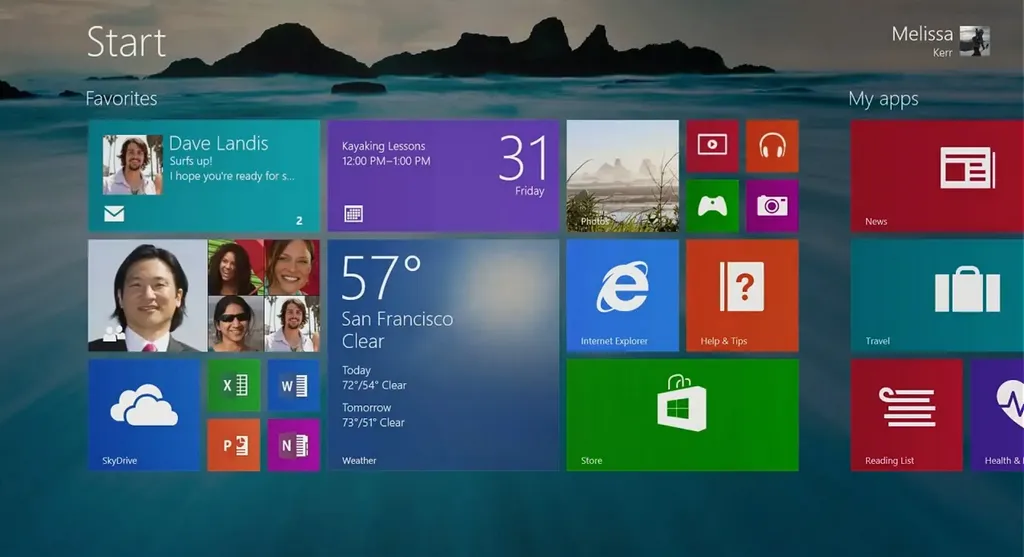
- Start Screen: หน้าจอเริ่มต้นที่ปรับแต่งได้ด้วยไทล์ (tiles) ที่มีชีวิต (live tiles) ซึ่งแสดงข้อมูลและอัปเดตเรียลไทม์
- Desktop Mode: โหมดเดสก์ท็อปที่คล้ายกับ Windows รุ่นก่อนหน้า เพื่อการทำงานที่สะดวกสบายสำหรับผู้ใช้เดิม
- นำปุ่ม Start กลับมา ซึ่งหายไปใน Windows 8 ทำให้ผู้ใช้สามารถเข้าถึงเมนู Start ได้อย่างรวดเร็ว
- ผู้ใช้สามารถปรับแต่งภาพพื้นหลังและการจัดวางไทล์บน Start Screen ได้อย่างยืดหยุ่นมากขึ้น
- รองรับการทำงานแบบหลายหน้าจอที่มีการปรับปรุงให้ดียิ่งขึ้น รวมถึงการทำงานที่ราบรื่นระหว่างหน้าจอต่างๆ
- มาพร้อมกับแอปพลิเคชันในตัวหลายตัว เช่น Mail, Calendar, Music, Video, และอื่นๆ ที่ได้รับการปรับปรุง
- ผู้ใช้สามารถดาวน์โหลดแอปพลิเคชันเพิ่มเติมจาก Windows Store ซึ่งมีแอปพลิเคชันมากมายให้เลือกใช้
- การค้นหาที่รวมเอาการค้นหาทั้งในเครื่องและบนเว็บเข้าด้วยกัน ทำให้ผู้ใช้สามารถค้นหาไฟล์ แอปพลิเคชัน และข้อมูลออนไลน์ได้ในที่เดียว
Features
- The Microsoft Diagnostics and Recovery Toolset (MSDaRT) 10 module is integrated into the system recovery service, whether it is launched from the installation media or integrated into the system itself
- Minor improvements have been made to the installer interface, correcting flaws in Microsoft programmers.
- The system is installed immediately with Russian and English language packs. The choice of language during installation only affects which of the languages will be the main one.
- It is possible to connect the automatic installation of drivers from Snappy Driver Installer or SamDrivers, as well as the automatic installation of programs from MinstAll.
- At the very early stage of the installation, there is a pre-boot menu in which you can choose the bit depth of the primary shell, that is, which installer will be used, 32-bit or 64-bit.
- Restored the functionality of the boot menu by pressing the F8 key at computer startup.
- Due to the fact that the assembly is a combined x86-x64 distribution with more than one language on board, installation from under the existing system is not available. The following installation options are possible: from the installation media as from a boot device in Legacy BIOS mode for both 32-bit and 64-bit OS; from the installation media as from a boot device in EFI / UEFI mode for 64-bit OS only.
ความต้องการของระบบ (System Requirements)
- ระบบปฏิบัติการ: 64-bit
- หน่วยความจำ (RAM): 4 GB (8 GB แนะนำ)
- พื้นที่ว่างในฮาร์ดดิสก์: 64 GB ขึ้นไป
ข้อมูลไฟล์ (File Info)
- ผู้พัฒนา: Microsoft
- ใบอนุญาต: Shareware
- ภาษา: รองรับหลายภาษา
- ขนาดไฟล์: 3.6 GB
- เวอร์ชัน: Build 9600
- ประเภทไฟล์: *.rar
- อัปเดตเมื่อ: 22/6/2022