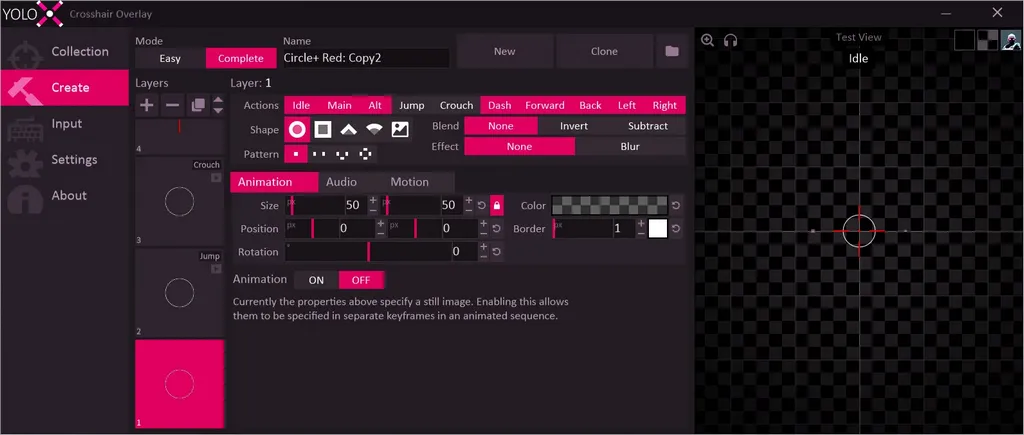
ดาวน์โหลด Dragonrise Games YoloX ฟรี ตัวเต็มถาวร โปรแกรมปรับแต่งและใช้งาน Crosshair ใช้ในการช่วยเล็งไปที่เป้าหมาย เปลี่ยนเป้าเล็งในเกม สำหรับเกม FPS
Dragonrise Games YoloX คืออะไร
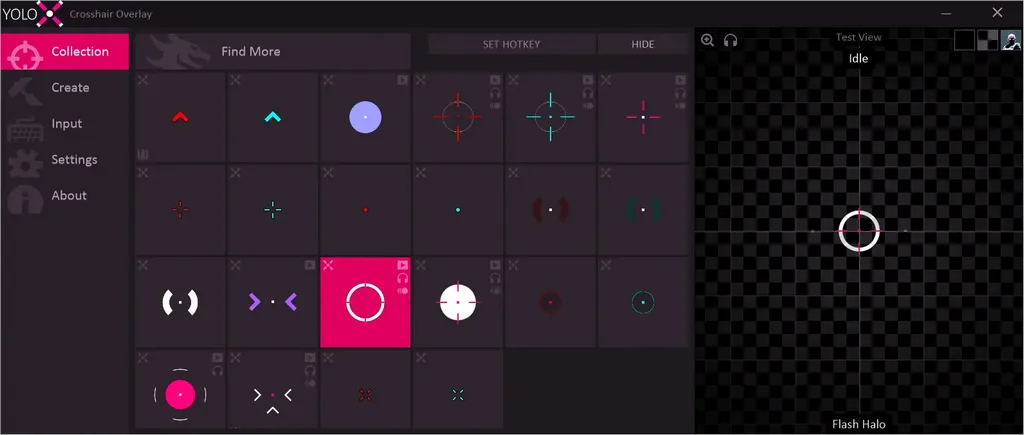
Dragonrise Games YoloX เป็นโปรแกรมที่ออกแบบมาเพื่อช่วยให้ผู้เล่นเกมสามารถปรับแต่งและใช้งาน crosshair (เครื่องหมายเล็ง) แบบกำหนดเองบนหน้าจอได้ เครื่องหมายเล็งนี้เป็นสัญลักษณ์ที่มักปรากฏอยู่ตรงกลางหน้าจอในเกมยิงมุมมองบุคคลที่หนึ่ง (FPS – First-Person Shooter) และใช้ในการช่วยเล็งไปที่เป้าหมาย เปลี่ยนเป้าเล็งในเกม มีทั้งสีกลับด้าน เซ็นเซอร์เสียง เซ็นเซอร์ตรวจจับการเคลื่อนไหว ระบบป้องกันความร้อน และฟีเจอร์อื่นๆ อีกมากมาย
คุณสมบัติของ Dragonrise Games YoloX
- สนับสนุนเกมหลายประเภท: ซอฟต์แวร์นี้สามารถใช้งานได้กับเกมหลายประเภท ไม่จำกัดเฉพาะเกม FPS เท่านั้น ทำให้มีความยืดหยุ่นในการใช้งาน
- ปรับแต่งได้: ผู้ใช้สามารถปรับแต่งสี, รูปร่าง, ขนาด, และลักษณะของ crosshair ได้ตามความต้องการส่วนตัว
- ไม่ต้องใช้การติดตั้งซับซ้อน: โดยปกติแล้วไม่ต้องการการติดตั้งที่ซับซ้อน เพียงเปิดใช้งานซอฟต์แวร์และเลือก crosshair ที่ต้องการ
- ไม่ใช่โปรแกรมโกง (Cheat): ไม่ถือเป็นโปรแกรมโกง เนื่องจากมันไม่ได้ทำให้ผู้เล่นมีความสามารถเหนือกว่าเกม (เช่นการมองทะลุกำแพงหรือการยิงอัตโนมัติ) แต่ช่วยให้ผู้เล่นเล็งเป้าหมายได้แม่นยำขึ้นเท่านั้น
บันทึกการปรับปรุง (Changelog)
- NEW: Create: Add easy mode to zoom and sonar.
- NEW: Welcome menu for new folks.
- NEW: Layer copy/paste support.
- NEW: Adaptive blend mode. Replaces Rotate.
- NEW: Preview pan support.
- NEW: GPU selector to address issues for some laptops.
- NEW: Y crosshair pattern.
- NEW: Assign: Settings menu that exposes existing game specific settings like scale and offset.
- NEW: Settings/Overrides section with options to override various UI actions. Moved “Show Messages” here.
- NEW: More included crosshairs.
- BUFF: General UI polish.
- BUFF: More flexible hotkeys. Example: “A S D F”
- BUFF: Smoother animation with a frame pacing tweak.
- BUFF: Settings: Reset: Add control over what’s reset.
- BUFF: Made borders outlined instead of overlapping with shape.
- BUFF: Changed default zoom toggle to CTRL Z. Also made zoom hold clear toggle state.
- BUFF: Improve drawing quality in pixel editor.
- BUFF: Zoom is no longer limited to 1 layer.
- BUFF: Crosshair hide toggle will now persist while YoloX is running. A menu warning will show if this is active.
- FIX: Inverted layers not being zoomed.
- FIX: Blur not working correctly across multiple layers.
- FIX: Menu showing on Windows start for some users.
- FIX: Crash caused by a specific assignment and UI sequence.
- FIX: Flicker and lower mouse latency while using UI on some systems.
- FIX: Disable zoom if its capture dependancy is unavailable, instead of showing a white shape.
- FIX: Taskbar icon disappearing when Windows explorer crashes.
- FIX: Sensitivity not updating correctly while adjusting zoom scale in the middle of a zoom.
- FIX: Avoid using certain GPU resources when zoom is enabled but not actively used, freeing up game performance.
- REMOVE: Safe Mode. Replaced by “Software” option in GPU selector.
- BUFF: Improve ammo counter support.
- BUFF: Improve layer priority system.
- BUFF: Improve crosshair hotkeys to work on a combination of features, instead of individual features only.
- NEW: Game and weapon specific cursors
หมายเหตุ
การใช้งานโปรแกรมประเภทนี้อาจขัดกับข้อกำหนดและเงื่อนไขของเกมบางเกม ดังนั้นควรตรวจสอบข้อกำหนดของเกมที่คุณกำลังเล่นเพื่อหลีกเลี่ยงการถูกแบนหรือระงับบัญชีผู้ใช้
ความต้องการของระบบ
- ระบบปฏิบัติการWindows 11 / 10 (32-bit และ 64-bit)
- หน่วยความจำ (RAM)2 GB (4 GB แนะนำ)
- พื้นที่ว่างในฮาร์ดดิสก์100 MB ขึ้นไป
ข้อมูลไฟล์
- ผู้พัฒนา
- Dragonrise Games
- ใบอนุญาต
- Shareware
- ภาษา
- รองรับหลายภาษา
- ขนาด
- 10 MB
- เวอร์ชัน
- 1.14
- ประเภท
- *.rar
- เผยแพร่เมื่อ
- อัปเดตเมื่อ
- รหัสแตกไฟล์
- axeload
ดาวน์โหลด
ระวังโฆษณาเด้งไปหน้าไฟล์ปลอม โปรดเช็คชื่อโปรแกรม, เวอร์ชัน, ขนาด, ประเภทไฟล์, เซิร์ฟเวอร์ ก่อนดาวน์โหลดทุกครั้ง