AI Video FaceSwap 2.1.0 | ถาวร โปรแกรมสลับใบหน้าด้วย AI

ดาวน์โหลด AI Video FaceSwap ตัวเต็มถาวร โปรแกรมทำหน้าที่เปลี่ยนใบหน้า สลับใบหน้าในวิดีโอ ซึ่งโปรแกรมนี้ใช้เทคโนโลยีที่ใช้ปัญญาประดิษฐ์ AI
AI Video FaceSwap คืออะไร
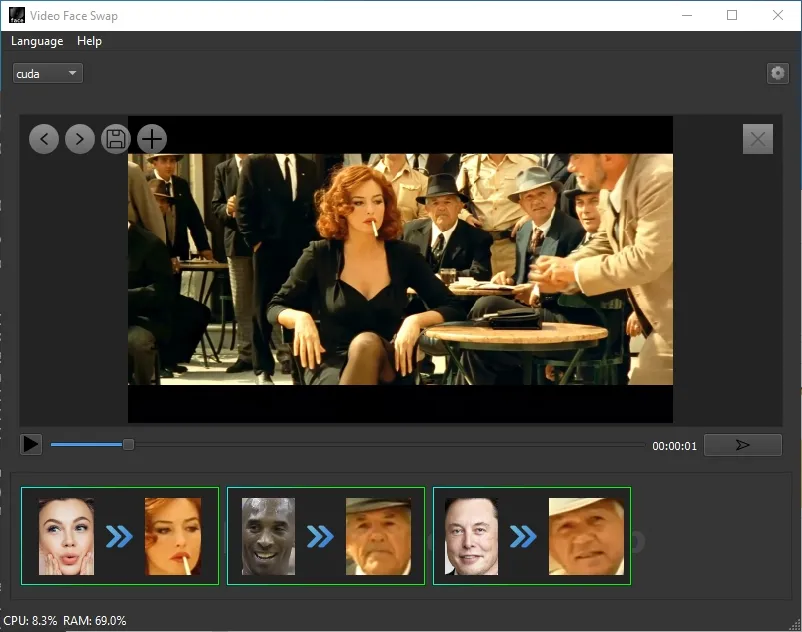
AI Video FaceSwap เป็นโปรแกรมสลับใบหน้าในวิดีโอ ซึ่งโปรแกรมนี้ใช้เทคโนโลยีที่ใช้ปัญญาประดิษฐ์ (AI) ในการแทนที่ใบหน้าของบุคคลในวิดีโอด้วยใบหน้าของบุคคลอื่น โดยการทำงานจะประกอบด้วยการวิเคราะห์และสร้างภาพใบหน้าใหม่ที่สอดคล้องกับการเคลื่อนไหว แสง และมุมกล้องของบุคคลที่อยู่ในวิดีโอ เพื่อให้ผลลัพธ์ออกมาสมจริง สลับใบหน้าในวิดีโอด้วย AI เป็นเทคโนโลยีที่ใช้ปัญญาประดิษฐ์ในการเปลี่ยนใบหน้าของบุคคลหนึ่งไปเป็นอีกบุคคลหนึ่งในวิดีโอได้อย่างสมจริง ผลลัพธ์ที่ได้จะดูเหมือนว่าบุคคลที่ถูกสลับใบหน้าเข้าไปเป็นคนทำกิจกรรมในวิดีโอนั้นจริงๆ
คุณสมบัติของ AI Video FaceSwap
- การวิเคราะห์ใบหน้า: AI จะทำการวิเคราะห์ใบหน้าของทั้งสองบุคคลที่ต้องการสลับ โดยพิจารณาถึงโครงสร้างใบหน้า, การแสดงออกทางสีหน้า, และลักษณะเฉพาะอื่นๆ
- การสร้างโมเดล: จากนั้น AI จะสร้างโมเดล 3 มิติของใบหน้าทั้งสองเพื่อใช้ในการสลับ
- การสลับใบหน้า: AI จะทำการแทนที่ใบหน้าในวิดีโอต้นฉบับด้วยใบหน้าใหม่ที่สร้างขึ้น โดยคำนึงถึงการเคลื่อนไหวของใบหน้าและการแสดงออกทางสีหน้าให้สอดคล้องกัน
Features
- Face swap for videos
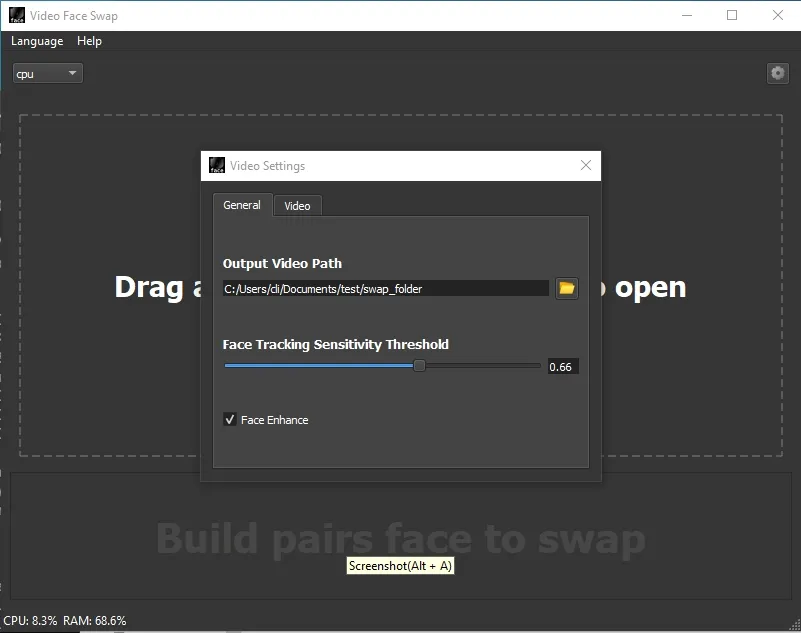
- Automatically change faces and enhance fusion
- No watermark output
- No data collection
- No internet required
- Easy to use
- Support edit
Key Features
- Multiple Video Formats: It supports various formats, including MP4, AVI, and MOV. This flexibility allows users to work with virtually any video file, making it a highly adaptable tool for different needs.
- Seamless Face Recognition: The software uses cutting-edge AI algorithms to detect and map faces accurately in any video. This ensures a precise and natural-looking face swap, maintaining the original video’s context and expressions.
- High-Quality Output: One of the tool’s standout features is its ability to produce high-quality videos. The swapped faces blend seamlessly with the original video, retaining the natural expressions and movements, resulting in a professional and polished final product.
- User-Friendly Interface: Even if you’re not tech-savvy, It is elementary. The intuitive interface guides you through the process, from importing your video to selecting the faces to swap, making the entire experience straightforward and enjoyable.
- Regular Updates: The tool’s developers are committed to continuous improvement. Regular updates mean you’ll always have access to the latest features and enhancements, keeping your software up-to-date with the latest advancements in AI technology.
- Real-Time Preview: Before finalizing your video, you can use the real-time preview feature to see how the swapped faces look. This allows you to make necessary adjustments to ensure the best possible result.
มีอะไรใหม่
- Supports multi-threading
- Support setting the start and end time of video swapping
- Support cancelling video generation
- Memory usage optimization
- Bug fixes
ความต้องการของระบบ (System Requirements)
- ระบบปฏิบัติการ: Windows 10 / 11 (32-bit และ 64-bit)
- หน่วยความจำ (RAM): 8 GB (16 GB แนะนำ)
- พื้นที่ว่างในฮาร์ดดิสก์: 2 GB
ข้อมูลไฟล์ (File Info)
- ผู้พัฒนา: Tuguoba
- ใบอนุญาต: Shareware
- ภาษา: รองรับหลายภาษา
- ขนาดไฟล์: 1.4 GB
- เวอร์ชัน: 2.1.0
- ประเภทไฟล์: *.rar
- อัปเดตเมื่อ: 4/6/2026
- รหัสแตกไฟล์: axeload